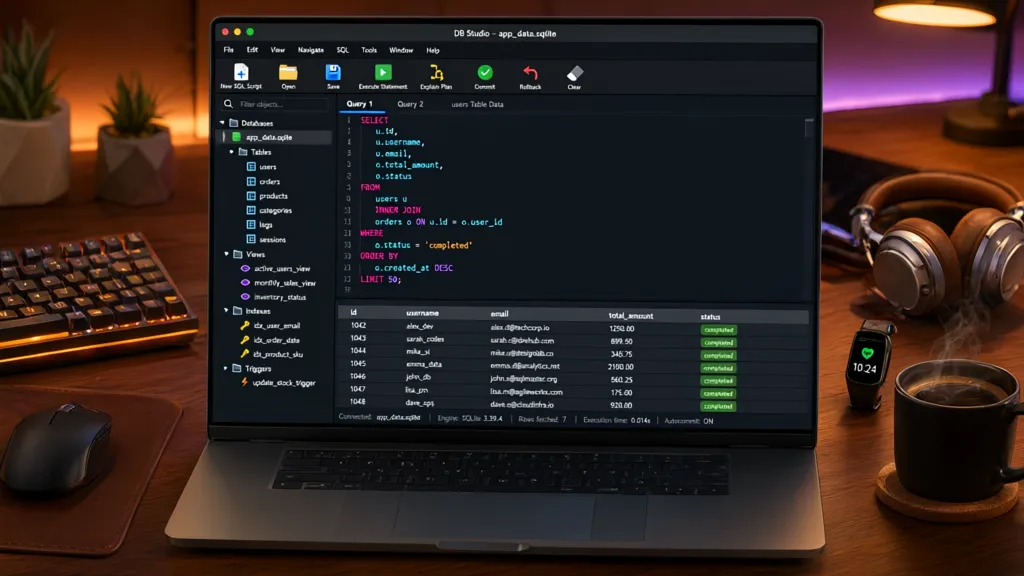
SQLite3 is an embedded database engine that is fast, lightweight, and easy to set up. It is serverless, meaning it doesn’t require a separate server process, which makes it an attractive option for applications needing a simple database solution.
One of the key advantages of SQLite3 is its simplicity. You can create a database in a matter of seconds and start executing SQL commands without the overhead of a complex installation process. That’s particularly beneficial for developers who want to prototype or develop small to medium-sized applications quickly.
Another significant advantage is its cross-platform nature. SQLite works on virtually any operating system, which facilitates portability of applications across different environments. This reduces the time developers spend worrying about compatibility issues.
SQLite is also highly reliable. It uses a file-based storage system that ensures data integrity, even in the case of application crashes. With its ACID compliance, you can be confident that your transactions are processed reliably. This reliability especially important for applications that handle critical data.
import sqlite3

# Connect to a database (or create it if it doesn't exist)
connection = sqlite3.connect('example.db')

# Create a new SQLite cursor
cursor = connection.cursor()

# Create a new table with the name 'users'
cursor.execute('''
CREATE TABLE users (
    id INTEGER PRIMARY KEY,
    name TEXT,
    age INTEGER
)
''')

# Commit the changes and close the connection
connection.commit()
connection.close()
With its efficiency and lightweight design, SQLite can manage databases that are considerably larger than what you might initially expect. This makes it suitable for applications that scale, without the need for a heavy-duty database management system.
Consider also the lack of setup and administration tasks that come with traditional database systems. With SQLite, you don’t have to worry about configuring a server, managing user access, or setting up complex backup procedures. It’s all embedded within your application, making it easier to manage and develop.
This ease of use extends to executing SQL commands as well. The simpler API allows you to run queries directly from your application code, making data manipulation intuitive.
# Example of inserting data into the 'users' table
cursor.execute('''
INSERT INTO users (name, age)
VALUES ('Alice', 30)
''')

# Querying the users table
cursor.execute('SELECT * FROM users')
for row in cursor.fetchall():
    print(row)
Performance-wise, SQLite is often faster than traditional databases for read-heavy workloads. This can be a significant advantage in applications where data retrieval speed is critical. Moreover, its lightweight nature means it can be embedded into applications with minimal impact on performance.

Now retrieving an image set.
Amazon Printable Gift Card | Print At Home
$50.00 (as of September 18, 2026 12:09 GMT +00:00 - More infoProduct prices and availability are accurate as of the date/time indicated and are subject to change. Any price and availability information displayed on [relevant Amazon Site(s), as applicable] at the time of purchase will apply to the purchase of this product.)Setting up your SQLite3 environment
To set up your SQLite3 environment, you’ll first need to ensure that you have the SQLite library installed. Most programming environments come with SQLite pre-installed, but if you need to install it manually, you can download it from the official SQLite website. Follow the instructions provided for your operating system to complete the installation.
Once installed, you can verify the installation by opening a terminal or command prompt and typing:
sqlite3 --version
This command should return the version number of SQLite, confirming that it is ready for use. Next, you can start an interactive SQLite session by simply typing:
sqlite3
This will take you into the SQLite command-line interface where you can start executing SQL commands directly. However, for most applications, you’ll want to connect to SQLite through your programming language of choice. Below is an example of how to set up SQLite in a Python environment:
import sqlite3

# Create a connection to the SQLite database
connection = sqlite3.connect('my_database.db')

# Create a cursor object using the connection
cursor = connection.cursor()
This establishes a connection to a database file named my_database.db. If the file does not exist, SQLite will create it for you. Next, you’ll want to handle potential errors that may arise during database operations. A common practice is to wrap your database code in try-except blocks:
try:
    # Your database operations here
    cursor.execute('CREATE TABLE IF NOT EXISTS products (id INTEGER PRIMARY KEY, name TEXT, price REAL)')
    connection.commit()
except sqlite3.Error as e:
    print(f"An error occurred: {e}")
finally:
    # Close the connection when done
    connection.close()
By using the try block, you can catch any exceptions raised during the execution of your SQL commands, which helps in debugging and maintaining the integrity of your application. This structured approach to error handling is essential for building robust applications.
Once your environment is set up, you can start defining table structures according to your application’s needs. SQLite supports a variety of data types such as INTEGER, REAL, TEXT, BLOB, and NULL, enabling you to store different kinds of data efficiently. When defining tables, think carefully about the data types you choose, as they can affect performance and storage.
# Example of creating a table for storing orders
cursor.execute('''
CREATE TABLE orders (
    order_id INTEGER PRIMARY KEY,
    user_id INTEGER,
    total REAL,
    created_at TEXT DEFAULT CURRENT_TIMESTAMP
)
''')
With the tables defined, you can start inserting, updating, and querying data. The simplicity of SQL syntax in SQLite makes it easy to interact with your data. For instance, to add a new order, you would use an INSERT statement:
cursor.execute('''
INSERT INTO orders (user_id, total)
VALUES (1, 99.99)
''')
After executing your commands, don’t forget to commit your changes to ensure that they’re saved in the database. For read operations, the SELECT statement is simpler and allows you to retrieve data efficiently:
cursor.execute('SELECT * FROM orders')
for order in cursor.fetchall():
    print(order)
This simplicity is what makes SQLite an appealing choice for many developers. You can quickly prototype data-driven applications without getting bogged down in the complexities of larger database systems. As you become more familiar with SQLite, you’ll appreciate its flexibility and power, allowing you to build applications that are both responsive and reliable.
As you continue to work with SQLite, keep in mind the importance of handling transactions properly. Using transactions can help maintain data integrity, especially when performing multiple related operations. For example, if you need to insert multiple records at once, you can use a transaction to ensure that either all inserts succeed or none at all:
try:
    cursor.execute('BEGIN TRANSACTION')
    cursor.execute('INSERT INTO orders (user_id, total) VALUES (2, 49.99)')
    cursor.execute('INSERT INTO orders (user_id, total) VALUES (3, 29.99)')
    connection.commit()
except sqlite3.Error as e:
    connection.rollback()
    print(f"Transaction failed: {e}")
finally:
    connection.close()
Defining table structures and data types
When designing your database schema, it’s important to consider the relationships between your tables. SQLite supports foreign keys, which allow you to maintain referential integrity between related tables. To enable foreign key support, you need to execute a specific command right after establishing your connection:
connection.execute('PRAGMA foreign_keys = ON')
With foreign keys enabled, you can define relationships in your table structures. For example, if you want to link the orders table to the users table, you can modify the orders table definition to include a foreign key constraint:
cursor.execute('''
CREATE TABLE orders (
    order_id INTEGER PRIMARY KEY,
    user_id INTEGER,
    total REAL,
    created_at TEXT DEFAULT CURRENT_TIMESTAMP,
    FOREIGN KEY (user_id) REFERENCES users(id)
)
''')
This setup ensures that each order must be associated with a valid user, preventing the insertion of orders with non-existent user IDs. Such constraints enhance data integrity and help maintain a clean dataset.
As you define your tables, think about indexing as well. Indexes can drastically improve the performance of your queries, especially on large datasets. You can create an index on a column to speed up searches:
cursor.execute('CREATE INDEX idx_user_id ON orders(user_id)')
This index will make lookups for orders by user_id much faster, which is particularly useful if your application frequently queries orders based on this field.
When it comes to data types, SQLite is flexible but also has its nuances. While it supports various data types, it uses a dynamic type system. This means that a column declared as INTEGER can still hold TEXT data if you choose to insert it. However, this flexibility can lead to unexpected behaviors, so it is best to stick to the intended data types for each column.
cursor.execute('''
CREATE TABLE products (
    product_id INTEGER PRIMARY KEY,
    name TEXT NOT NULL,
    price REAL CHECK(price >= 0)
)
''')
In the products table example, the CHECK constraint ensures that the price cannot be negative. Such constraints are not just for data integrity; they also serve as a form of documentation for anyone who might interact with your database schema later.
As you define your tables and constraints, keep in mind the importance of normalization. Normalization involves organizing your data to minimize redundancy and improve data integrity. In many cases, you may want to break down your tables into smaller, related tables that can be linked through foreign keys, rather than having a single large table with many fields.
For instance, instead of storing user details directly in the orders table, you could create a separate user_details table that holds additional information about users. This not only keeps your data organized but also allows for easier updates and maintenance.
cursor.execute('''
CREATE TABLE user_details (
    user_id INTEGER PRIMARY KEY,
    email TEXT,
    address TEXT,
    FOREIGN KEY (user_id) REFERENCES users(id)
)
''')
By adopting a normalized structure, you can efficiently manage relationships and ensure that updates to user information propagate correctly throughout your database. This approach can save a lot of headaches down the line, especially in applications with complex data interactions.
With a solid understanding of table structures, data types, and constraints, you can build a robust foundation for your SQLite database. This foundation will enable you to execute commands effectively and handle errors gracefully, ensuring that your application functions slickly and competently.
try:
    cursor.execute('''
    INSERT INTO user_details (user_id, email, address)
    VALUES (1, '[email protected]', '123 Main St')
    ''')
    connection.commit()
except sqlite3.Error as e:
    connection.rollback()
    print(f"Failed to insert user details: {e}")
finally:
    connection.close()
As you begin to execute commands, remember that error handling very important. SQLite can raise exceptions for various reasons, such as constraint violations or syntax errors. Being prepared to catch and manage these exceptions will enhance the stability of your application.
Executing commands and handling errors
When executing commands with SQLite, understanding how to handle errors is essential for maintaining application stability. SQLite raises exceptions for various issues, including syntax errors or violations of constraints, which can disrupt the flow of your program if not managed properly.
One common approach to error handling is to implement a structured try-except block around your database operations. This allows you to catch exceptions and respond accordingly, whether that means rolling back transactions or logging error messages for further investigation.
try:
    cursor.execute('INSERT INTO users (name, age) VALUES (?, ?)', ('Bob', 25))
    connection.commit()
except sqlite3.IntegrityError as e:
    print(f"Integrity error: {e}")
except sqlite3.OperationalError as e:
    print(f"Operational error: {e}")
finally:
    connection.close()
In this example, different types of exceptions are caught separately. By doing so, you can provide more specific error messages, which can greatly aid in debugging. For instance, an IntegrityError may indicate a problem with foreign keys or unique constraints, while an OperationalError might signal issues with the database connection.
Additionally, the use of parameterized queries, as shown in the INSERT statement, is a best practice that not only helps prevent SQL injection attacks but also improves error handling by clearly defining the expected data types for each column.
As you build more complex queries, you might encounter situations where you need to execute multiple commands in a single transaction. In such cases, wrapping your commands in a transaction block can help ensure that either all commands succeed or none are executed at all, maintaining data consistency.
try:
    cursor.execute('BEGIN TRANSACTION')
    cursor.execute('INSERT INTO users (name, age) VALUES (?, ?)', ('Charlie', 22))
    cursor.execute('INSERT INTO orders (user_id, total) VALUES (?, ?)', (1, 59.99))
    connection.commit()
except sqlite3.Error as e:
    connection.rollback()
    print(f"Transaction failed: {e}")
finally:
    connection.close()
In this transaction example, if any of the INSERT operations fail, the rollback ensures that no changes are made to the database, preserving its integrity. That’s particularly important in applications where multiple related changes must remain consistent with each other.
When executing commands, it is also wise to consider logging the errors. Implementing a logging system can help you track issues over time and provide insights into how often certain errors occur, which can inform future optimizations or changes to your database schema.
import logging

logging.basicConfig(level=logging.ERROR, filename='db_errors.log')

try:
    cursor.execute('INSERT INTO users (name, age) VALUES (?, ?)', ('David', 30))
    connection.commit()
except sqlite3.Error as e:
    logging.error(f"Database error: {e}")
    connection.rollback()
finally:
    connection.close()
In this case, errors are logged to a file for later review, which can be invaluable for debugging in production environments. By adopting such practices, you can build resilience into your applications, making them less prone to failure due to unhandled exceptions.
As you advance with SQLite, you’ll find that handling commands and errors effectively can significantly enhance the user experience of your application. The ability to gracefully manage failures not only improves reliability but also contributes to a more polished and professional software product.