MongoDB is a NoSQL database that stores data in a flexible, JSON-like format called BSON. This structure allows for documents to have varying fields and types, making it particularly powerful for applications where the data schema may evolve over time. Each document in MongoDB is identified by a unique _id field, which is automatically created if not provided.
Consider a simple example of a user document:
{
  "_id": ObjectId("60c72b2f9b1e8d3f8c6e2f7a"),
  "name": "Vatslav Kowalsky",
  "email": "[email protected]",
  "age": 30,
  "interests": ["coding", "music", "hiking"]
}
This document illustrates how MongoDB allows for nested structures. Here, interests is an array, which can hold multiple values. This flexibility enables developers to model their data in a way that closely mirrors the application’s requirements without rigid schemas.
One of the first things to understand is how to interact with these documents through the MongoDB shell or a driver. In Python, we typically use PyMongo to interface with the database. Here’s how you might set up a connection and insert a new document:
from pymongo import MongoClient

client = MongoClient("mongodb://localhost:27017/")
db = client["mydatabase"]
collection = db["users"]

user = {
  "name": "Jane Doe",
  "email": "[email protected]",
  "age": 28,
  "interests": ["reading", "traveling"]
}
collection.insert_one(user)
Once you have documents stored, querying becomes simpler. You can retrieve documents based on various criteria without the need for complex joins, as you might find in relational databases. For example, to find all users over the age of 25:
results = collection.find({"age": {"$gt": 25}})
for user in results:
    print(user)
This simplicity extends to updates as well. MongoDB’s update operations allow you to modify existing documents with ease. You can perform a simple update or use operators to add elements to arrays or increment values:
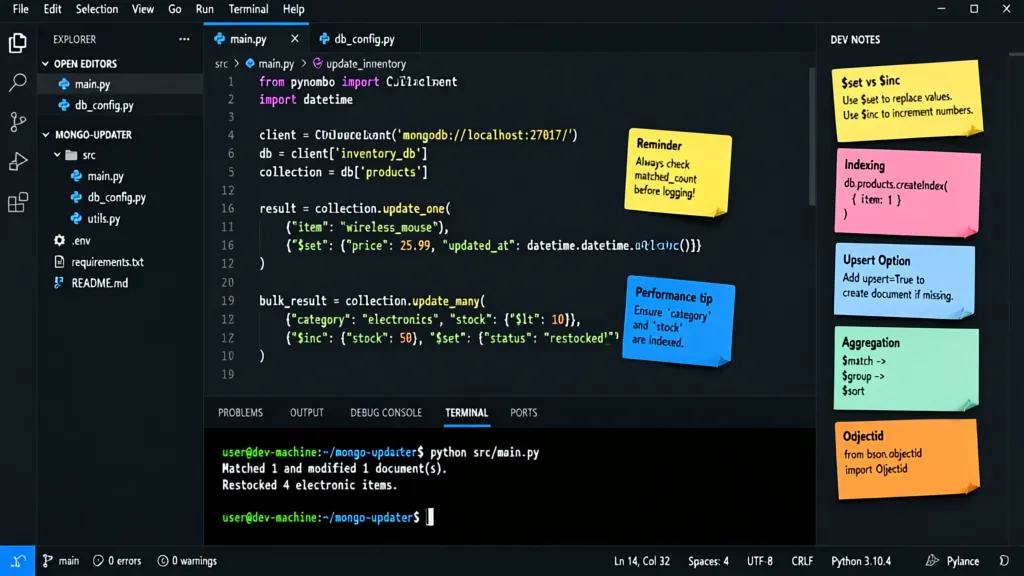
collection.update_one(
    {"name": "Nick Johnson"},
    {"$set": {"age": 31}, "$addToSet": {"interests": "programming"}}
)
Understanding how to structure your documents effectively very important as it influences how you will query and manipulate your data later. One of the benefits of using MongoDB is its ability to handle complex data types and structures, allowing for more natural data modeling.
As you design your documents, consider the access patterns of your application. If certain fields are frequently queried together, it might make sense to embed them within a single document rather than spreading them across multiple documents. This can lead to performance improvements and reduced complexity in your queries. However, be cautious of embedding too deeply, as this can lead to larger document sizes that may impact performance when retrieving or updating data.

YZAESHAY Replacement 65W USB C Laptop Charger Compatible with HP Chromebook and All 65W USB Type C Power Adapter
$9.99 (as of October 14, 2026 00:39 GMT +00:00 - More infoProduct prices and availability are accurate as of the date/time indicated and are subject to change. Any price and availability information displayed on [relevant Amazon Site(s), as applicable] at the time of purchase will apply to the purchase of this product.)The power of PyMongo in database interactions
When using PyMongo, you also have the option to use the aggregation framework, which is a powerful way to perform operations on your data. Aggregations allow you to process data records and return computed results. For example, if you wanted to count how many users share a specific interest, you could use the following aggregation pipeline:
pipeline = [
    {"$unwind": "$interests"},
    {"$group": {"_id": "$interests", "count": {"$sum": 1}}}
]
results = collection.aggregate(pipeline)
for interest in results:
    print(interest)
This will give you a count of users for each interest, which can be particularly useful for analytics or reporting purposes. The power of the aggregation framework lies in its ability to combine multiple stages, allowing for complex transformations and calculations.
Another aspect to consider is the use of indexes to enhance query performance. MongoDB supports various types of indexes, including single-field, compound, and text indexes. Creating an index on frequently queried fields can significantly speed up the retrieval of documents. Here’s how you can create an index on the email field:
collection.create_index([("email", 1)])
Using indexes, however, is a double-edged sword; while they improve read performance, they can slow down write operations and consume additional disk space. It’s essential to analyze your application’s read/write patterns to determine the best indexing strategy.
As you work with updates, you might encounter scenarios where a document’s structure needs to be modified. For instance, if you want to rename a field across all documents, you can use the $rename operator:
collection.update_many(
    {},
    {"$rename": {"interests": "hobbies"}}
)
This command will update all documents in the collection, changing the field name from interests to hobbies. Such operations should be done with care, especially in production environments, as they can have widespread effects on your data.
Another common requirement is to handle document deletions. MongoDB provides simpler methods to remove documents from your collections. To delete a single document, you can use:
collection.delete_one({"name": "Jane Doe"})
For bulk deletions, you can use delete_many, which allows you to specify criteria for multiple documents:
collection.delete_many({"age": {"$lt": 20}})
These operations are essential for maintaining the integrity and relevance of your data. Remember that when you delete documents, they’re removed permanently unless you have a backup mechanism in place. It’s wise to implement soft deletes where you mark documents as inactive rather than removing them entirely, especially in applications where historical data may be valuable.
As you dive deeper into MongoDB with PyMongo, keep in mind that each decision you make regarding document structure, indexing, and data manipulation will impact the overall performance and maintainability of your application. The key is to iteratively refine your approach based on real-world usage and performance metrics, ensuring that your application can scale effectively as it grows.
Strategies for effective document updates in your application
When it comes to performing updates in MongoDB, it’s essential to leverage the various operators available to you. For example, if you need to increment a user’s age by one year, you can achieve this by using the $inc operator. This operator allows you to update numeric fields efficiently without needing to retrieve the document first:
collection.update_one(
    {"name": "Neil Hamilton"},
    {"$inc": {"age": 1}}
)
In scenarios where you need to update an array field, you can use the $push operator to add elements to an array. If Alex Stein decides to take up another interest, you can simply push this new interest into his document:
collection.update_one(
    {"name": "Mitch Carter"},
    {"$push": {"interests": "photography"}}
)
Conversely, if you want to remove an item from an array, the $pull operator comes into play. This operator will help you maintain clean and relevant data by which will allow you to remove unwanted elements:
collection.update_one(
    {"name": "Frank McKinnon"},
    {"$pull": {"interests": "music"}}
)
It’s crucial to understand the implications of each update operation on your documents. For instance, when modifying array elements, you might want to consider whether the order of elements matters or if you need to preserve specific indexes. MongoDB allows for positional operators like $ to update specific array elements based on a query condition:
collection.update_one(
    {"name": "Mitch Carter", "interests": "coding"},
    {"$set": {"interests.$": "software development"}}
)
In this case, the $ operator identifies the first matching element in the array, which will allow you to perform an update without needing to know the exact index of the element.
Additionally, you may encounter scenarios where you need to update documents conditionally. MongoDB supports conditional updates using the $cond operator within aggregation pipelines. This allows for more complex logic to determine how a document should be updated:
pipeline = [
    {
        "$set": {
            "age": {
                "$cond": {
                    "if": {"$gt": ["$age", 30]},
                    "then": "$age",
                    "else": {"$add": ["$age", 1]}
                }
            }
        }
    }
]
collection.update_many({}, pipeline)
This example demonstrates how you can conditionally update the age field based on its current value, allowing for more nuanced data manipulation.
As your application scales, you’ll want to ensure that updates are not only efficient but also maintain data integrity. Implementing transactions in MongoDB can help achieve atomicity across multiple updates, which is particularly useful when dealing with related documents that need to be updated simultaneously:
with client.start_session() as session:
    with session.start_transaction():
        collection.update_one({"name": "Nick Johnson"}, {"$set": {"age": 32}}, session=session)
        collection.update_one({"name": "Jane Doe"}, {"$set": {"age": 29}}, session=session)
This pattern ensures that either all updates succeed, or none do, which is vital for maintaining consistent data state across your application.